


Helping children navigate and understand their emotions, and how to deal with them.
CHALLENGE
Kids often struggle to label or regulate emotions, which can turn into frustration or tantrums — a stress point for both child and caregiver.
SOLUTION
Mivi (“Navigating Me”) is an interactive digital book series built to guide kids through emotional self-awareness. Through interactive stories, children practice strategies (introduced via characters) and develop stronger emotional vocabulary and regulation.
TOOLS
Procreate
Wix
Figma
ROLE
UX/UI Design
UX Research
Interaction Design
TIMELINE
Jul 2022-Apr 2024
TEAM
Solo Project
DISCOVERY
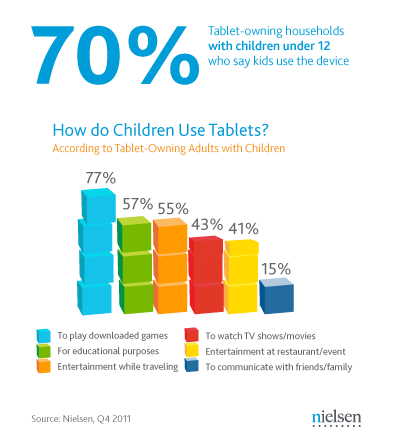
In the digital age, children frequently indulge in YouTube or gaming on electronic devices. my research aligned with Nielsen's findings, revealing gaming as a predominant electronic activity. This insight steered the interactive design of Mivi's books, aiming to captivate and engage young minds.
During my research, I explored resources on children's emotional well-being and techniques for self-soothing. For example, some strategies I found to manage anger were:
Taking a deep breath - increases the supply of oxygen to the brain, slowing down heart rate and helping stimulate relaxation to reduce stress
Visualizing a quiet place - a cognitive tool utilizing imagination to achieve a more relaxed state of mind
Counting to 10 - shifts focus from anger-inducing situations
BRAINSTORM
Example Book - I Won't Let My Anger Control Me!
Similar to a user flow, the brainstorm outlined the order of interactions in each book scene, guiding the reader through the narrative seamlessly.


ILLUSTRATION
To distribute the eBook, I exported the files from Procreate as a PDF and saved it to Google Drive. Subsequently, I shared the PDF link on Mivi's official Wix site, ensuring easy access and user-friendly navigation.
ILLUSTRATION
Tailored for a youthful audience, the design incorporated simplicity, vibrant colors, and captivating illustrations to enhance visual appeal.
Additionally, I fused a game-like experience with a traditional eBook, ensuring a more engaging and entertaining learning approach for children.
To facilitate user understanding, I incorporated a tutorial/instruction screen before readers delved into the interactive story.

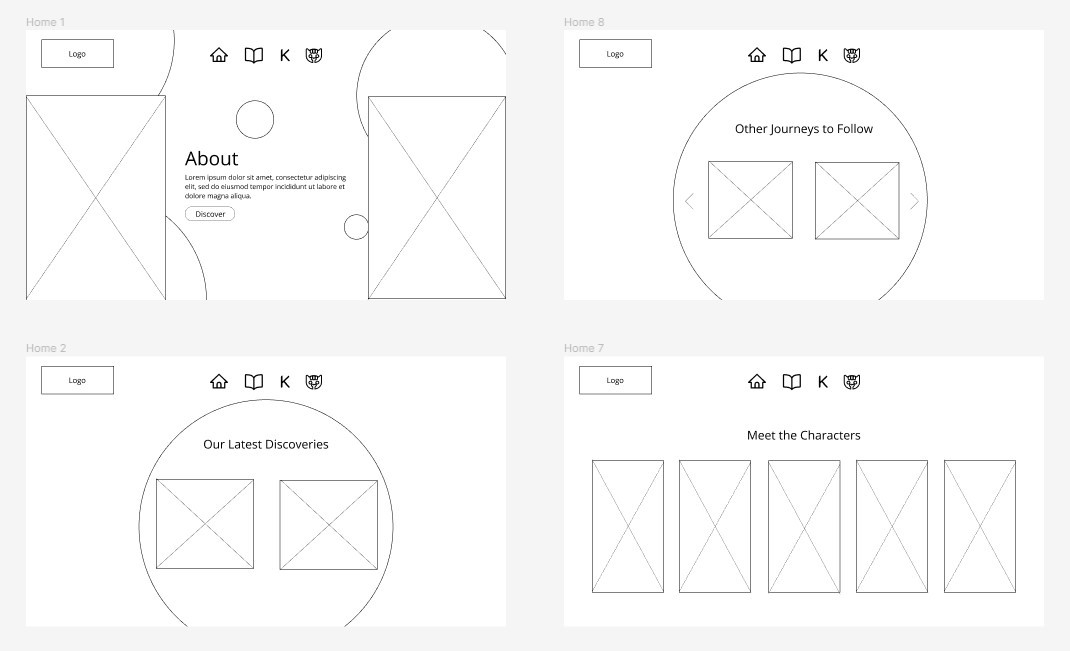
LOW FIDELITY WIREFRAMING

STYLE GUIDE

Takeaways
Adapting and finding resources
Being my first UX/UI project, I found myself with a limited understanding of Figma and other essential design tools. In order to bridge this knowledge gap, I actively sought guidance from various sources, turning to YouTube and Google as valuable educational platforms.
Thinking in Multiple Perspectives
Cultivating a mindset that encompasses multiple perspectives, especially prioritizing the user's viewpoint over my own, emerged as a pivotal aspect of my role as a UX designer. This project prompted me to reconsider the simplicity of certain aspects from the user's standpoint, leading me to appreciate the importance of designing a product that resonates as user-friendly.
© Kaylie Lai 2025
klai.kaylie@gmail.com